Thirteen Zones, Zero Photoshop (Almost)
180 art assets in three hours via a code-controlled AI pipeline. Plus why I abandoned ComfyUI (not because it was bad, but because it pulled me into designer mode) and my confession about Firefly AI.
By the end of the rebrand day, Geo Climber had a name, an identity, and a premise: a climb from the center of the Earth to the summit of Everest through thirteen real geological zones. What it didn't have was art for any of those thirteen zones. Every platform was still rendering as a placeholder rectangle. Every background was still crude. The visual identity I'd pitched in the rebrand was, at this point, a PDF in my head.
This post is about the day I generated art for thirteen zones in roughly three hours. It's also the day the project's most important automation breakthrough happened: the moment I stopped trying to be a designer and started being an engineer who delegates design to a pipeline.
The scale problem
Concrete numbers.
Each geological zone needs one background (tileable vertically, since the camera scrolls up forever) and 13 platform variants: three short, three medium, three long, two extra long, one very-extra-long, and one full-width milestone platform that spans the entire viewport.
That's 14 assets per zone. Times 13 zones is 182 art assets.
On the naive workflow from post 5 (Codex, GPT prompt, GPT mood board, Photoshop, manual asset cutting, struggle-with-Claude-to-implement), one zone would have taken half a day minimum. Thirteen zones would have been a month of pure design work. A month I didn't have, and a month of work I didn't want to do because design isn't my expertise and slogging through it would have killed the project's momentum.
So I did what every engineer does when they hit a repeatable manual task: I built a pipeline.
This was my idea, not Claude's
This idea came from me, not Claude. This matters because I've given Claude a lot of credit across the series: for suggesting the Metal architecture, for suggesting Workload Identity Federation, for naming Inge Lehmann. In all those cases, Claude's suggestions landed and I implemented them.
The zone art pipeline was different. When I first described the scale problem to Claude ("I need art for thirteen zones, each with 14 assets"), Claude's suggestions were all variations of "let me help you generate one zone at a time, iteratively, as a design collaboration." Fine advice for someone who wants to hand-craft each zone. Terrible advice for me, because what I wanted was a reproducible pipeline that I could rerun when I changed my mind about the visual style, not a set of one-off designs I'd have to curate and version by hand.
So I pushed back. I said: "I don't want to collaborate on design. I want to write code that generates all the zones deterministically. What would that look like?"
That pushback is the moment the whole approach shifted. Claude helped me build the pipeline, but the framing ("code over design, automation over craft, pipeline over artifacts") had to come from me. Claude is very good at helping you do the thing you describe. Claude is less good at reframing the thing you're doing. If you have a clearer vision than the default approach, you have to articulate it explicitly. Don't let the AI pick the approach for you by default.
The pipeline that worked
Here's the specific workflow that ended up working. It took a lot of iteration to land on this, and I'm going to describe the final version because the failed earlier versions aren't useful.
-
Source screenshot. Take a screenshot of the game running with placeholder rectangular platforms. This gives the image model the exact game canvas: aspect ratio, platform positions, character size, camera framing. Without this reference, the model has no idea what "a zone for this game" means.
-
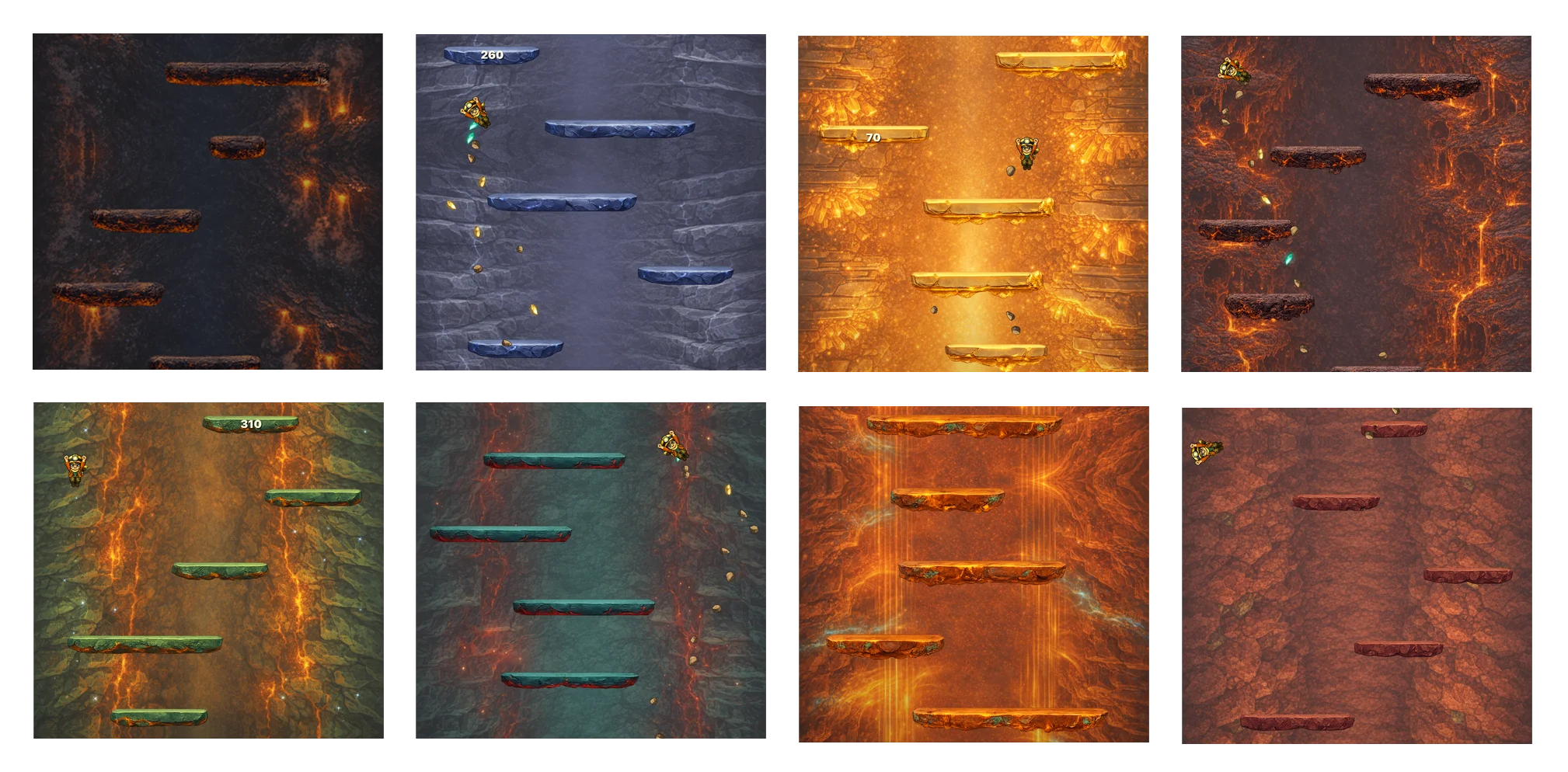
Full game concept. Feed the source screenshot plus a zone brief (e.g., "lower mantle: molten rock with crystallized veins, orange-red palette, high pressure") to OpenAI's gpt-image model and ask it to generate a single full-screen concept image of the game as if the rectangles had been replaced with zone-appropriate art. This gives a unified visual target: backgrounds and platforms in the same image, consistent palette, consistent style.
-
Background. Feed the concept image back to gpt-image and ask it to extract just the background, tileable vertically. Having the concept as reference means the background matches the platforms even though they're being generated separately.
-
Empty platform sheet plus concept. Feed gpt-image an empty "platform sheet" template (blank PNG with 13 outlined rectangles in the standard sizes) plus the concept image, and ask it to fill each outlined rectangle with a platform variant matching the concept style. The dual reference (empty template for structure, concept for style) is the step that makes it all work. Without it, the platforms don't match the background. With it, they do.
-
Cut the sheet. A Python script I wrote (
split_platform_sheet.py) takes the filled sheet and extracts each platform variant into its own transparent PNG using connected-component detection. No more manual Photoshop slicing. -
Import into the game. Copy the backgrounds and platform PNGs into
apps/ios/Resources/Levels/{zone-slug}/and updategame-content.jsonto register the new zone.
Steps 1-5 are scripted. Step 6 is semi-scripted (eventually I built a level-implementer agent that does it automatically).
Total time per zone: roughly 15 minutes of iteration, including fixing prompts and regenerating anything that came out wrong. Times thirteen zones = ~3 hours. PR #25 landed at 09:31 with 787 files touched: all thirteen zones, all the backgrounds, all the platform variants, and the config updates to make the game load them dynamically.
Three hours. Twenty-five bucks worth of OpenAI API calls. Thirteen zones of game art done.
The ComfyUI detour
In parallel with the OpenAI pipeline, I tried ComfyUI. ComfyUI is a node-based local AI image workflow tool, much more powerful than OpenAI's API for image generation. You can chain together diffusion steps, use custom models, apply controlnet guides, and generally have fine-grained control over the generation process.
ComfyUI got to a point. It was producing usable output. The generated zones were better than the OpenAI ones in some cases: more consistent style, better control over palette, more adjustable details.
And I abandoned it.
Here's why. ComfyUI pulled me into designer mode. Every node graph decision was a micro-design choice: which sampling method, which steps count, which CFG scale, which controlnet weight, which post-processing filter. These are all valid creative choices a real artist makes. But each one was also a time sink for someone who is not a real artist and shouldn't be pretending to be one.
I was about two hours into fiddling with ComfyUI settings when I caught myself thinking "this is taking forever." And I realized: of course it's taking forever. I'm not a designer. I don't have aesthetic intuition for sampling methods. I don't have the instinct to know "this looks better with 30 steps than 40." I was guessing and checking, and when you guess-and-check at design decisions without intuition, you're just burning time hoping for a result.
ComfyUI is a great tool. It's also a time sink for non-designers. The skill it rewards is design intuition, and if you don't have that, you'll either get mediocre results or spend all your time trying to fake it.
I abandoned ComfyUI and went back to the OpenAI API pipeline. The OpenAI pipeline is inferior to ComfyUI in raw capability but superior to ComfyUI for me specifically, because it rewards engineering skills (prompt iteration, script control, reproducibility) instead of design skills.
The lesson: know which tools pull you into which mindsets. Tools aren't neutral. They push you toward a particular way of working. If you pick a tool whose native mindset is far from your native expertise, you'll either underperform on that axis or overinvest in becoming good at the wrong thing. Pick the tool that plays to your existing strengths and delegate the rest.
There's also a future-state version of this. Someday, when Geo Climber has a real budget for art, I'll hire a real designer and give them ComfyUI (or whatever the equivalent is by then). The tool is fine. It's just not fine for me as the person wearing every hat.
Firefly AI, or: I am not a caveman
Three hours for all thirteen zones is a great number. But it's not the whole truth.
The worst failure mode was the full-width milestone platforms, the full-01 that spans the entire viewport. For a few zones, gpt-image would return two completely separate half-width platforms instead of one continuous wide image. Not a seam. Two disconnected pieces. Prompt engineering couldn't fix it; something about very wide aspect ratios makes the model treat the request as a split composition.
So I pulled the halves into Photoshop and merged them. But the "manual" step was AI-assisted: I'd position the two halves, select a band across the join, and let Adobe Firefly AI's generative fill paint the bridging pixels. I am not a caveman. When the primary pipeline hits an edge case, the fallback isn't hand-painting a seam. It's reaching for a different AI tool. Photoshop was the coordination canvas, not the generator.
The automation curve this kicked off inspired how I do everything from this day forward. Once you experience "thirteen zones in three hours" after experiencing "one settings panel in half a day," you can never go back to the old workflow. The rest of the project is downstream of this realization.
The geological accuracy confession
One more thing. The thirteen zone names, physical descriptions, temperature/pressure flavor text, and visual palettes weren't researched by me. I have zero geology knowledge beyond what I half-remember from high school science class.
I asked Claude to design the progression. Claude came up with the zone sequence (Inner Core, Outer Core, Lower Mantle, Upper Mantle, Magma Chambers, Deep Crust Caves, Ocean Floor, Deep Ocean, Shallow Ocean, Surface Lowlands, Mountain Range, Death Zone), the physical descriptions, the color palettes, and the temperature/pressure flavor text that shapes each zone's art prompt. I reviewed it, made a few tweaks, and shipped it.
Is the geology perfect? Probably not. A real geologist could probably tell you what's slightly wrong with each zone. But the bar for a game isn't "peer-reviewed scientific accuracy." The bar is "plausibility and vibe." And on that bar, Claude delivered.
Let Claude handle domains you don't have expertise in when the bar is plausibility, not correctness. For a game, artistic and vibe plausibility is the real requirement. For a medical application, it isn't. Know which side of that line you're on before you delegate.
The fact that Inge Lehmann (the character) is a real scientist and the zones are scientifically plausible enough to pass the vibe test is the same idea approached from two directions. Real science where accuracy matters (her name, her role in history), plausible vibe where it doesn't (the exact geology of the Upper Mantle zone). Both contribute to the game feeling intentional without requiring me to become a geophysicist.
This is post 9 of 18 in a series about building Geo Climber with Claude Code. Thirteen zones in three hours. The code-controlled AI art pipeline that reshaped how I think about automation. Join the Discord and download Geo Climber on the App Store.